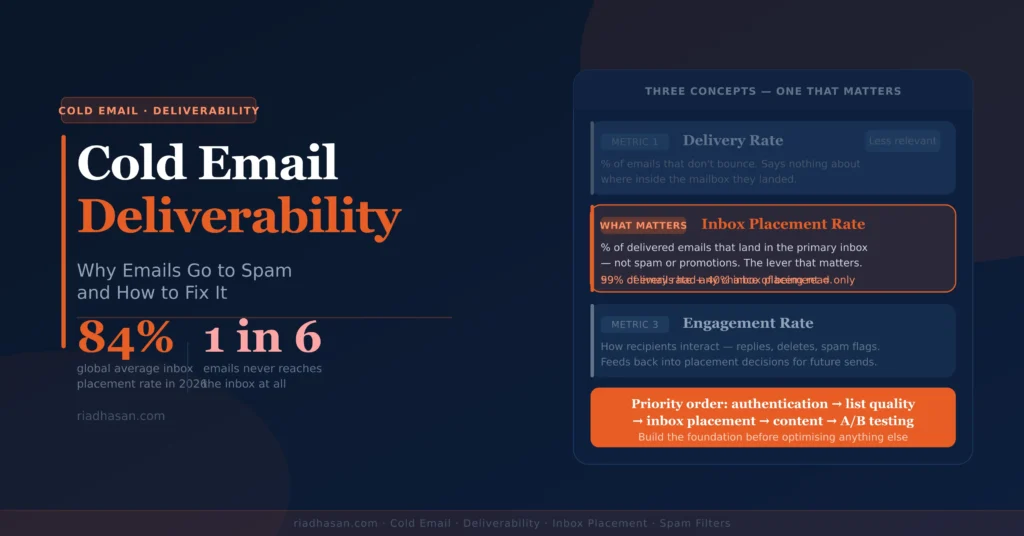
Cold email deliverability is the measure of whether your emails reach the primary inbox rather than the spam folder, promotions tab or a hard bounce. The global average inbox placement rate across all senders in 2026 sits at approximately 84%. That means roughly one in six emails never reaches the inbox regardless of how good the copy is.
For cold email specifically, the problem is worse. There is no prior engagement history to signal legitimacy. Every email is arriving from an unknown sender to a recipient who didn’t request it. The technical setup underneath the campaign either compensates for that deficit or compounds it.
This guide covers why cold emails land in spam, what open tracking does to deliverability, how to test inbox placement, the best tools for diagnosing problems and how to recover a damaged sending domain.
What Cold Email Deliverability Actually Means
There are three distinct concepts that get conflated under “deliverability”, each with a different problem and a different fix:
- Delivery rate: the percentage of emails that don’t bounce. A 99% delivery rate means 99% reached a mailbox server. It says nothing about where they were placed inside that mailbox.
- Inbox placement rate: the percentage of delivered emails that land in the primary inbox, not spam or promotions. This is the number that actually matters for cold email campaigns.
- Engagement rate: how recipients interact with emails that did reach the inbox — opens, replies, deletes without reading. Engagement feeds back into sender reputation and affects future placement.
The inbox placement rate is the lever. A 99% delivery rate with 40% inbox placement means only 59% of emails had any chance of being seen. Improving delivery rate from 99% to 99.5% produces a marginal gain. Improving inbox placement from 40% to 80% doubles the effective reach of every campaign you run.
How inbox placement is determined in 2026
Google processes over 15 billion emails per day using machine learning models that evaluate sender reputation, domain authentication, content signals, behavioural patterns and recipient engagement history. Microsoft’s Exchange Online Protection uses a layered approach across similar dimensions. Neither system applies static rules — they adapt continuously based on what real recipients do with emails from your domain.
The practical implication: you can’t game modern spam filters. Every shortcut that worked in 2019 (keyword manipulation, excessive link cloaking, fake unsubscribe footers) is now a signal that triggers filtering. The only sustainable path to strong inbox placement is building genuine sender credibility through proper setup, relevant content and positive recipient engagement.
The Main Factors That Affect Cold Email Deliverability
1. Domain authentication (SPF, DKIM, DMARC)
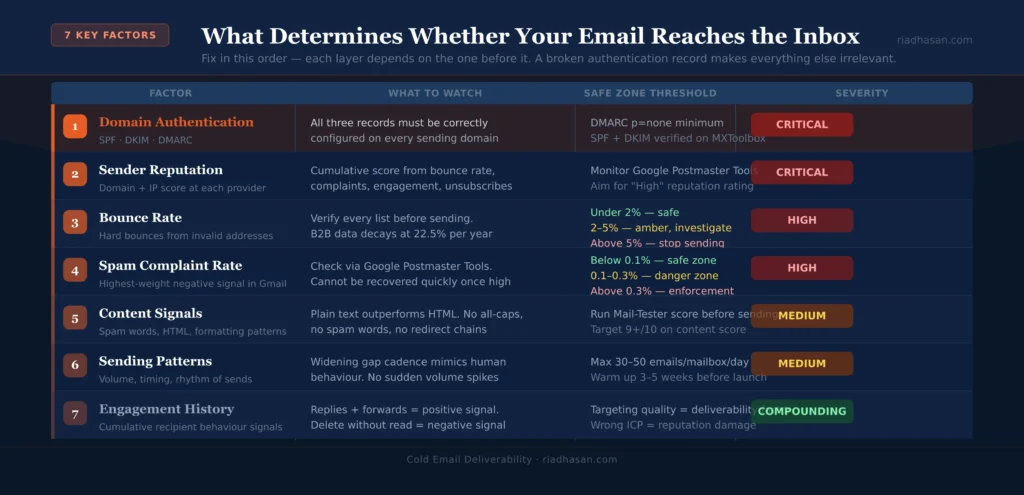
The foundational layer. SPF tells receiving servers which IP addresses are authorised to send from your domain. DKIM adds a cryptographic signature to each email that proves it hasn’t been tampered with. DMARC specifies what to do when SPF or DKIM fail and sends you reporting data on authentication results.
All three must be correctly configured on every sending domain. Since Google and Yahoo’s February 2024 enforcement update (now fully active), senders dispatching more than 5,000 emails per day to personal Gmail or Yahoo addresses must have DMARC configured or face systematic throttling.
2. Sender reputation
Sender reputation is a score maintained by email providers for every sending domain and IP address. It feeds from: bounce rate, spam complaint rate, unsubscribe rate, delete-without-reading rate and positive engagement (replies, moves from spam to inbox). A high reputation produces consistent primary inbox placement. A damaged reputation produces inconsistent placement regardless of what you change in the email itself.
Reputation is domain-specific. This is why cold email best practice separates the primary business domain from secondary sending domains. If a cold campaign damages a sending domain’s reputation, you replace the domain rather than risking the same damage to the domain that carries your website and business email.
3. Bounce rate
Hard bounces (emails rejected because the address doesn’t exist) are a strong negative signal. A bounce rate above 2% damages domain reputation and can trigger spam filter thresholds. Above 5% risks being blocked by major providers entirely. Every prospect list must be verified before any email sends. This is not optional at any scale.
4. Spam complaint rate
Google’s threshold: below 0.1% to stay in the safe zone; 0.3% triggers throttling and enforcement. One spam complaint per 1,000 emails pushes you toward the danger zone. Spam complaints are the single highest-weight negative signal in Gmail’s filtering system and cannot be recovered quickly once accumulated.
5. Content signals
Email content is scanned by content-based filters looking for: spam trigger words (free, urgent, limited time, guaranteed), excessive capitalisation, multiple exclamation marks, HTML-heavy formatting with low text-to-image ratios, broken URLs, redirect chains and mismatched sender display names. Plain-text or near-plain-text emails consistently outperform HTML-heavy ones for cold outreach precisely because they produce fewer content filter signals.
6. Sending patterns and temporal signals
Spam filters in 2026 analyse the rhythm of sending, not just the volume. Sending at the exact same time every day, at perfectly regular intervals, creates a temporal pattern that identifies automated scripts. The “widening gap” cadence between follow-ups mimics human sending behaviour precisely because it avoids this pattern detection. Sudden volume spikes on a new domain are another strong filter trigger — warm-up protocols exist to prevent this.
7. Engagement history
Email providers track how recipients interact with mail from your domain. If a high percentage of recipients delete your emails without reading them, mark them as spam or never engage, the provider learns your emails are unwanted and reduces inbox placement accordingly. If recipients reply, move emails from spam to inbox or forward them, the provider learns your emails are valued and improves placement. This feedback loop makes targeting quality a deliverability factor, not just a performance factor.
Open Tracking: Benefits, Risks and the 2026 Reality
Open tracking works by embedding a 1×1 transparent pixel image in each email. When the recipient’s email client loads the image, the send records an “open” against that email. It is the most widely used analytics feature in cold email tooling and also one of the most damaging to deliverability.
Why open tracking hurts deliverability
The tracking pixel adds HTML markup to a plain-text email. That markup signals to spam filters that the email contains hidden content, which is a standard spam indicator. If the domain hosting the tracking pixel has a poor reputation from other senders sharing the same infrastructure, that reputation contaminates your email. The pixel also adds a network request that some corporate email security systems flag as suspicious outbound communication.
The practical impact: disabling open tracking produces a +2–10 percentage point inbox placement lift on cold outbound, according to Prospeo’s 2026 analysis. Belkins disabled the tracking pixel across their campaigns and recorded a 3% higher average reply rate in campaigns without it. One operator on r/coldemail ran a 500,000-email campaign with 85% reported open rate and under 1% actual human engagement. The “opens” were bot and proxy server activity, not humans.
Why open rate data is unreliable in 2026
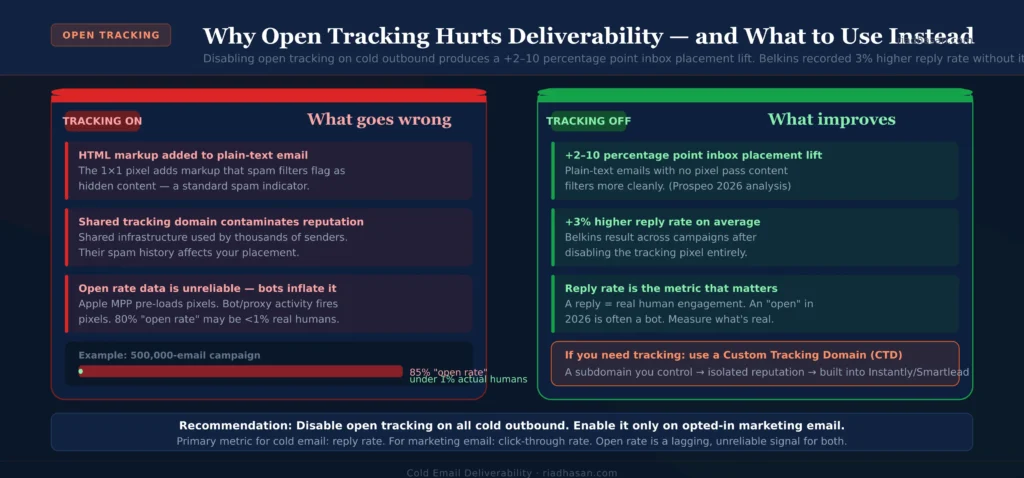
Apple’s Mail Privacy Protection, active since 2021 and now covering a substantial portion of iOS and macOS users, pre-loads email content including tracking pixels before the user actually opens the email. This inflates open rates with automated pixel fires that represent no human action. Google began flagging more emails with “suspicious message” banners from August 2024 onward, suppressing pixel loads from domains with poor reputations. By 2026, an 80% reported open rate on a cold campaign is more likely a measurement artefact than a genuine engagement signal.
When to use open tracking
| Email type | Open tracking recommendation | Primary metric instead |
|---|---|---|
| Cold outbound, first touch | OFF — disable completely | Reply rate |
| Cold outbound, follow-ups | OFF until inbox placement is confirmed healthy | Reply rate, meeting booked rate |
| Warm outbound (inbound leads) | Optional — directional trends only | Click-through rate, replies |
| Opted-in email marketing | ON — use as directional health metric | Click-through rate |
If you want to use open tracking on cold email campaigns, configure a custom tracking domain (CTD): a subdomain you control pointing to your sending tool’s tracking server. A CTD isolates your tracking reputation from shared infrastructure used by thousands of other senders. This is a standard setup step in Instantly and Smartlead.
Subject line optimisation and deliverability
Subject lines affect deliverability in two ways most people don’t realise. First, content-based filters scan the subject line for spam trigger words before the email body is assessed. All-caps anywhere in the subject line, multiple exclamation marks and specific high-spam-signal words trigger filtering at the subject line level. Second, a subject line that consistently generates high delete-without-reading rates damages sender reputation over time, even if the email technically reaches the inbox.
Subject line optimisation for deliverability means keeping it plain and lowercase-friendly, avoiding trigger words and formatting patterns that look like marketing rather than personal email and testing for reply rate rather than open rate. A subject line that earns a reply is a deliverability asset. A subject line that earns a delete is a reputation liability.
How to Test Cold Email Inbox Placement
Never assume your emails are landing in the primary inbox because the delivery rate looks clean. Delivery rate only confirms the email reached a server. Inbox placement tests tell you where inside that mailbox it landed.
Run an inbox placement test before launching any new campaign or any time you change sending infrastructure:
Tools for inbox placement testing
- GlockApps — tests delivery across Gmail, Outlook, Yahoo and others simultaneously, with detailed inbox vs. spam vs. promotions breakdown. The most comprehensive cold email placement testing tool in the market.
- MailReach Score — gives a sender score and inbox placement rate across major providers. Built into MailReach’s warm-up platform, which means you get ongoing monitoring alongside the score.
- Mail-Tester — free spam score check for individual emails. Good for quick diagnostics on specific emails but not for systematic placement testing at scale.
- MXToolbox — verifies SPF, DKIM and DMARC configuration and checks domain blacklist status. The first tool to run when diagnosing a suspected deliverability problem.
- Google Postmaster Tools — free Google tool that shows spam rate, domain reputation, delivery errors and authentication data for Gmail specifically. Essential for any cold email operation sending to Google Workspace or Gmail addresses.
- Microsoft SNDS / Sender Hub — Microsoft’s equivalent for Outlook and Hotmail deliverability data. Run alongside Postmaster Tools for full coverage of the two dominant enterprise email providers.
What a healthy placement test looks like
Primary inbox: 90%+ is the target for cold email campaigns. 75–89% means meaningful work is landing in promotions or spam. Investigate authentication and content signals. Below 75% primary inbox placement is a serious problem requiring full infrastructure diagnosis before any campaign sends.
AI Tools for Avoiding Spam Filters
Several AI-powered tools specifically target spam filter avoidance and deliverability optimisation in 2026:
- Lavender — real-time email scoring in Gmail and Outlook. Scores emails against deliverability and engagement criteria before they send, flagging spam trigger words, length issues and personalisation gaps. Used by 50,000+ sales reps. Its AI coach provides specific improvement suggestions inline.
- Warmforge / Mailforge — AI-powered warm-up network. Warmforge builds sender reputation through automated warm-up email exchanges in its network, with active monitoring of inbox placement and spam flag alerts.
- MailReach — AI-driven warm-up with sentiment analysis on warm-up email exchanges. Analyses whether the warming emails read as human-generated or automated, adjusting the warming cadence accordingly.
- Instantly‘s AI Spam Analyzer — built into the Instantly platform, analyses campaign emails before sending and flags content-based spam triggers with suggested rewrites.
- GlockApps Spam Test — beyond inbox placement, GlockApps scores email content against spam filter rules from major providers, showing which specific elements are triggering risk flags.
On the SEMrush question: SEMrush is primarily an SEO and content marketing tool. It does not have a dedicated cold email spam checker. For deliverability and spam checking in cold email, the tools above are purpose-built for that function. The only overlap is that SEMrush’s email marketing tools cover marketing email deliverability — not cold outreach specifically.
How to Diagnose and Recover a Damaged Sending Domain
Deliverability problems don’t always announce themselves clearly. Reply rates drop but open rates (inflated by bots) look fine. Campaigns send without errors but meetings stop being booked. The diagnostic process matters as much as the fix.
Step 1: Identify the layer where the problem is
- Authentication failure: run MXToolbox on every sending domain. Misconfigured DKIM is the most common cause of sudden deliverability drops.
- Blacklist listing: check MXToolbox blacklist lookup. A single blacklist listing can suppress inbox placement across an entire workspace.
- Spam complaint spike: check Google Postmaster Tools for spam rate. If the rate spiked with a specific campaign, that campaign’s content or targeting is the cause.
- High bounce rate: pull bounce data from your sending tool. A bounce rate above 2% points to list data quality problems.
- Content filter trigger: run Mail-Tester or GlockApps on the specific emails in the failing campaign. Content flags show up at the email level.
Step 2: Stop the damage
Pause all campaigns on the affected domain immediately. Continuing to send from a damaged domain accelerates the reputation decay and makes recovery longer. Do not move to a new domain and resume the same campaign. The same content and targeting will damage the new domain at the same rate.
Step 3: Fix the root cause
Fix the specific layer identified in step one before resuming any sends. Authentication issues: fix DNS records, verify with MXToolbox, wait 24–48 hours for propagation. Blacklist issues: submit a delisting request to each blacklist provider. If it’s complaint rate: review the targeting and content that generated complaints and fix both before resuming. If it’s bounce rate: re-verify your entire list with NeverBounce or ZeroBounce.
Step 4: Rebuild reputation gradually
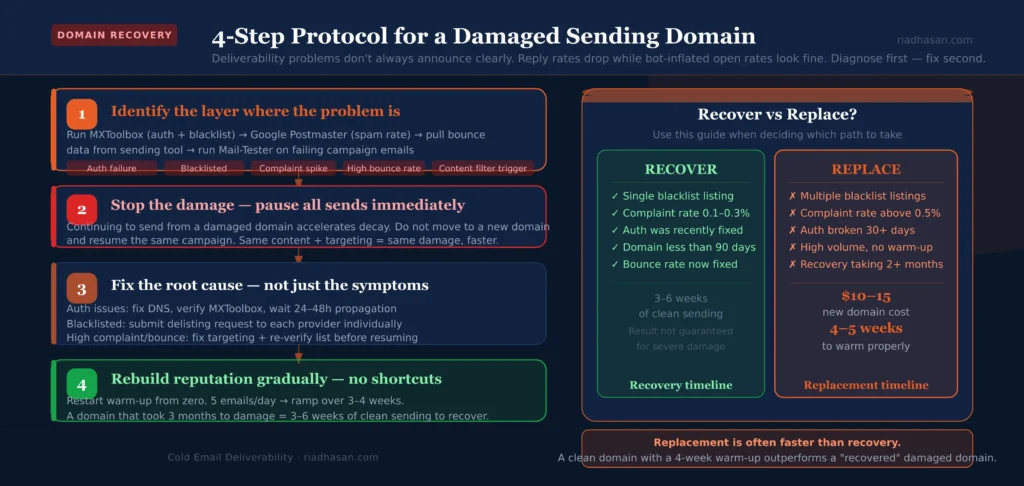
After fixing the root cause, restart warm-up on the affected domain. Treat it like a new domain: start at 5 emails per day, ramp slowly over 3–4 weeks. Don’t rush. A domain that took 3 months to damage will take 3–6 weeks of clean sending to recover meaningful reputation. There is no shortcut.
When to replace a domain vs. recover it
If a domain has been blacklisted by multiple major providers, has accumulated a spam complaint rate above 0.5% or has been sending at high volume with misconfigured authentication for more than 30 days, replacement is often faster than recovery. A new secondary domain costs $10–15, takes 4–5 weeks to warm up properly and starts with a clean reputation. Recovery from severe damage can take 2–3 months and isn’t guaranteed.
Frequently Asked Questions
What is cold email deliverability?
Cold email deliverability is the measure of whether your outreach emails reach the recipient’s primary inbox rather than being filtered into spam, the promotions tab or bouncing entirely. The global average inbox placement rate is approximately 84%, meaning roughly one in six emails never reaches the inbox regardless of content quality. For cold email specifically, deliverability depends on domain authentication (SPF, DKIM, DMARC), sender reputation, list quality, sending patterns and email content signals.
Why do cold emails go to spam?
Cold emails go to spam for one or more of these reasons: missing or misconfigured DNS authentication records, high bounce rate from unverified list data, spam complaint rate above 0.1%, content-based triggers (spam words, all-caps, excessive HTML), sending patterns that look automated rather than human and poor sender reputation from past campaign behaviour. The most common cause is infrastructure problems rather than copy problems — fix the technical layer before changing email content.
Does open tracking hurt cold email deliverability?
Yes. Open tracking pixels add HTML markup that spam filters flag as suspicious, can carry poor reputation from shared tracking infrastructure and produce unreliable data due to Apple’s Mail Privacy Protection pre-loading pixels before humans open emails. Disabling open tracking on cold outbound produces a +2–10 percentage point inbox placement lift. Belkins recorded a 3% higher average reply rate after disabling the tracking pixel. For cold email, reply rate is the primary metric — open rate is both unreliable and deliverability-damaging.
What are the best spam checker tools for cold email?
For inbox placement testing: GlockApps (most comprehensive, tests across Gmail, Outlook, Yahoo). For authentication verification: MXToolbox (SPF, DKIM, DMARC, blacklist check). For ongoing sender reputation monitoring: Google Postmaster Tools (Gmail-specific, free) and Microsoft Sender Hub (Outlook-specific). For pre-send content scoring: Mail-Tester (free, individual email score) and Lavender (real-time scoring in Gmail). For warm-up and placement monitoring: MailReach. These are purpose-built cold email deliverability tools — SEMrush is an SEO tool and does not provide cold email spam checking.
How do subject lines affect deliverability?
Subject lines affect deliverability at two levels. First, content-based spam filters scan the subject line before the email body. All-caps, multiple exclamation marks and specific trigger words (free, urgent, guaranteed, limited time) produce immediate filtering signals. Second, subject lines that consistently generate delete-without-reading responses build negative engagement history on your domain, which feeds back into sender reputation and reduces future inbox placement. Optimise subject lines for reply rate, not open rate — a subject line that earns a reply is a deliverability asset, one that earns a delete is a liability.
How do I recover a damaged cold email domain?
Stop all sending on the affected domain immediately. Run MXToolbox to identify authentication issues and blacklist listings. Check Google Postmaster Tools for spam rate data. Fix the root cause: authentication misconfiguration, blacklisting, high complaint rate or bad list data. After fixing, restart warm-up from zero and ramp over 3–4 weeks before resuming campaigns. If the domain has been blacklisted by multiple major providers or has a spam complaint rate above 0.5%, replacing it with a new domain is often faster than recovering the original.
Deliverability Is the Infrastructure, Not the Copy
Every other optimisation in cold email (subject lines, personalisation, follow-up sequences, templates) depends on the email reaching the inbox first. Deliverability is the infrastructure layer that everything else runs on. When it’s broken, no improvement to copy or targeting produces results. When it’s healthy, every other improvement compounds.
The practical priority order: authentication before content, list quality before personalisation, inbox placement before A/B testing. Build the foundation correctly and the campaign has a chance. Skip it and the campaign is invisible before it starts.
- Cold Email Infrastructure Setup — domain purchase, DNS configuration, warm-up protocol and sending tool connection
- Cold Email Best Practices 2026 — the complete system from targeting to reply management
- Best Cold Email Tools — platforms with built-in deliverability monitoring and warm-up
- Cold Email Lead Generation — list building and verification that keeps bounce rate low
If you want cold email infrastructure built and managed correctly from the start, you can work with me directly at riadhasan.com.