I’ve spent five years building cold email systems for B2B clients — SaaS companies, agencies, fintech firms and consultants across multiple industries. In that time I’ve seen the same mistakes made over and over, and I’ve seen what actually moves reply rates. This guide covers both cold email best practices and what actually works right now.
Cold email in 2026 works. But it works differently than it did three years ago. Inboxes are smarter, recipients are more skeptical and the old spray-and-pray playbooks are dead. What’s working now is more precise, more technical and more personal than most people expect.
Here’s what I’ve learned. I still apply all of it to every campaign I run.
Get Your Infrastructure Right Before Anything Else
This is the single most common mistake I see. People obsess over copy and ignore setup. Then they wonder why nothing lands.
Infrastructure isn’t a detail. It’s the foundation. A brilliant email sequence running on a broken setup will fail every time.
Use dedicated sending domains, not your main domain
Your primary domain (the one on your website and business cards) should never send cold email. If a campaign goes wrong — deliverability issues, spam complaints, blacklisting — you want that damage contained to a secondary domain, not your main brand.
The standard setup: buy 2–3 sending domains that are variations of your main domain. For riadhasan.com, that might be riadhasan.co or riadhasan-outreach.com. They look legitimate, they’re recognizably you, but they’re isolated from your core domain reputation.
Configure SPF, DKIM and DMARC on Every Domain
These three DNS records are non-negotiable. Together they tell email providers that you are who you say you are and that your emails are authorized to send from your domain.
- SPF — lists which servers are allowed to send email on behalf of your domain
- DKIM — adds a cryptographic signature to each email to verify it hasn’t been tampered with
- DMARC — tells receiving servers what to do if SPF or DKIM fail and sends you reports on authentication results
I’ve verified DNS records manually for 1,500 domains across client projects. Automated tools miss edge cases. At any scale, a misconfigured DMARC policy can blacklist every account in a workspace simultaneously. Check each record individually before you send a single email.
Warm up every new inbox properly
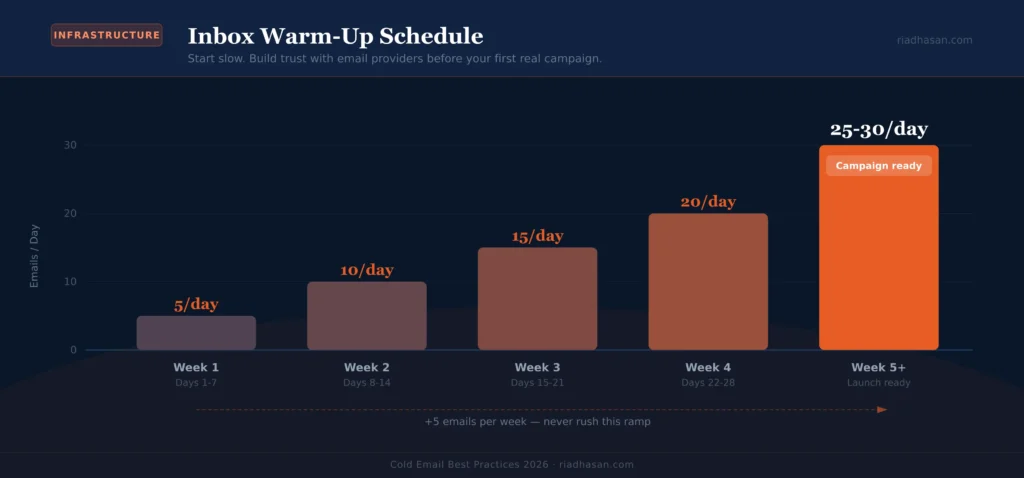
A brand-new email account has zero sending history. Start sending cold campaigns from it on day one and you’ll hit spam folders immediately. Email providers need to see a gradual, natural sending pattern before they trust a new inbox.
The protocol I use: start at 5 emails per day, increase by 5 each week, reach 25–30 per day by week five. Use a warm-up tool (Instantly, Smartlead and MailReach all have built-in warm-up) running simultaneously with a positive reply ratio. Don’t rush this. The patience is what produces 80%+ open rates on day one of your actual campaign.
Related reading
Cold Email Infrastructure Setup: Domains, Mailboxes, DNS & Warm-Up — the full technical guide with step-by-step configuration for every layer.
2. Define Your ICP Before You Write a Single Word
Targeting is where most campaigns fail. Not copy. Not subject lines. Targeting.
An Ideal Customer Profile (ICP) is not “B2B companies between 10 and 500 employees.” That’s a demographic. An ICP is a description of the specific type of company and specific type of person within that company who has the problem you solve, has the budget to pay for it and has the authority to say yes.
Get specific on four dimensions
- Company: industry, size, revenue range, tech stack, growth stage, funding status
- Person: job title, seniority, department, what they’re responsible for
- Problem: the specific pain point your offer addresses — not a vague frustration, a real operational problem
- Trigger: what event or condition makes this person likely to buy right now (new hire, funding round, product launch, company rebrand)
The trigger dimension is what separates a 3% reply rate from a 12% reply rate. Reaching a VP of Sales who just joined a new company is a different conversation than reaching the same person six months in. Timing matters as much as targeting.
Build your list from multiple sources
No single data source is clean enough to rely on alone. I combine Apollo.io for initial prospecting, LinkedIn Sales Navigator for verification and Clay for enrichment and personalization data. Every email address goes through a verification tool before the campaign runs. Bounce rates above 5% start hurting your sender reputation — there’s no recovery shortcut from that.
Related reading
Cold Email Lead Generation: How to Build a B2B Pipeline From Zero — ICP research, list building, data enrichment and verification in one guide.
3. Write Shorter Emails Than You Think You Should
The most common copy mistake is writing too much. A cold email is not a sales page. Its only job is to earn a reply.
The recipient didn’t ask to hear from you. They’re busy. Your email is competing with dozens of others in an already-full inbox. The moment they sense a pitch coming, they’re gone.
The four-part structure that works
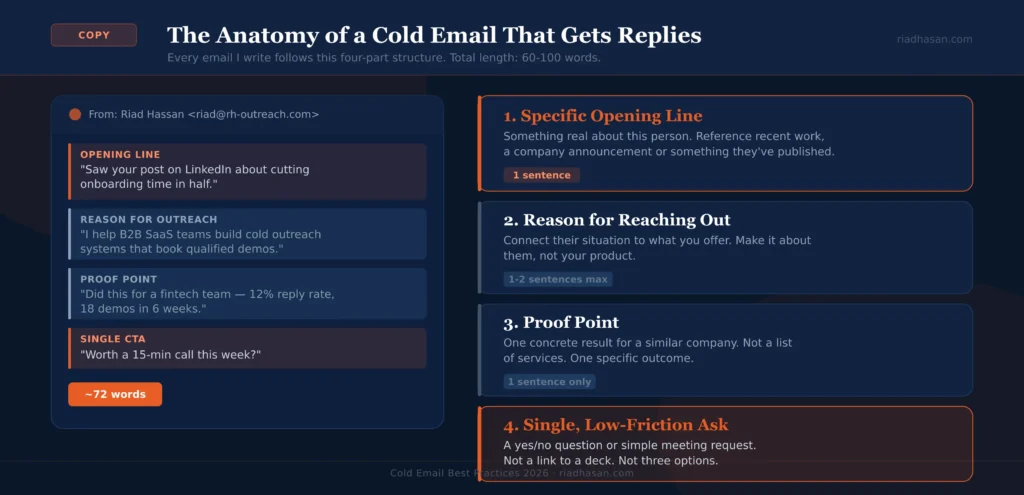
Every cold email I write follows this structure:
- A specific opening line — something real about this person or company, not a template. Reference their recent work, a company announcement, something they’ve published. One sentence.
- A clear reason you’re reaching out — connect their situation to what you offer. One to two sentences maximum.
- A proof point or relevant result — one concrete example of what you’ve done for a similar company. Not a list of services. One specific outcome.
- A single, low-friction ask — a yes/no question or a simple meeting request. Not a link to a 15-page deck.
Total length: 60–100 words. If you’re over 100 words, cut.
What to stop doing in 2026
These patterns used to work. They don’t anymore. Because everyone does them:
- Opening with “I hope this email finds you well” or any variation of it
- Listing three to five features of your product in the first email
- Starting with “I came across your profile on LinkedIn and was impressed”
- Ending with “Let me know if you’d like to schedule a call at your convenience”
- Fake familiarity openers like “Fellow [industry] professional here”
These read as templates the moment a prospect sees them. When something reads as a template, it gets deleted.
Use your real name in the sender field
This is a question that comes up constantly: should I send from a personal name or a company name? Personal name, every time. “Riad from RH Outreach” gets more opens than “RH Outreach Team.” People respond to people, not brands — especially in cold outreach where there’s no existing relationship to build on.
Related reading
Cold Email Subject Lines: 60+ Proven Examples That Get Opens — formulas, real examples by niche and what the data says about length, personalization and curiosity gaps.
4. Personalize at the Right Level — Not Every Level
Personalization is not putting {{first_name}} in the subject line. Everyone knows how mail merge works. That’s not personalization, it’s a variable.
Real personalization means referencing something specific about this person that shows you actually looked at them before emailing. It takes more work, but the reply rate difference is significant — in my experience, genuinely personalized first lines lift replies by 30–50% compared to generic openers.
The three tiers of personalization
| Tier | What it is | Time cost |
|---|---|---|
| Account-level | Reference the company: funding round, product launch, job opening, news mention | 2–3 min per lead |
| Individual-level | Reference the person: LinkedIn post, article they wrote, talk they gave, role change | 4–6 min per lead |
| Segment-level | Write a custom opener for a specific job title or industry — not one person, but one segment | Once per segment |
For most B2B campaigns, segment-level personalization is the practical sweet spot. Write a different opening line for each job title or industry vertical you’re targeting. It reads as personal without requiring 5 minutes per lead. Reserve individual-level personalization for high-value accounts where the deal size justifies the research time.
Related reading
Cold Email Personalization: How to Scale 1-to-1 Outreach — icebreakers, personalization variables, Clay workflows and how to stay human at scale.
5. Follow Up — But With Something Worth Reading
Most positive responses — industry estimates put it at 50–70% — come from follow-up emails, not the first one. Most people who don’t reply to your first email didn’t make a conscious decision to ignore you. They were busy, distracted or the timing was wrong. A follow-up is a second chance at the right moment.
The mistake most people make: follow-up emails that just say “bumping this up your inbox” or “just checking in.” Those add zero value. They confirm to the recipient that you have nothing new to say — and that makes it easier to ignore you.
What each follow-up should do
- Follow-up 2 (day 3–4): add a different angle — a relevant case study, a stat, a specific result you got for a similar company
- Follow-up 3 (day 7–8): change the format — a shorter, more direct ask, or a question that invites a response even if the answer is no
- Follow-up 4 (day 12–14): the break-up email — let them know this is your last message. Something like “If this isn’t relevant, no worries — just let me know and I won’t follow up again.” Break-up emails often get the highest reply rates of the whole sequence.
Three to four touches is the right range. Going beyond five follow-ups starts generating spam complaints, which damage your sender reputation in ways that affect every campaign you run, not just this one.
Related reading
Cold Email Follow-Up: The Right Timing, Sequence & Templates — what to say in each follow-up, timing intervals and why the break-up email works.
6. Monitor Deliverability Like It’s Your Job
You can have the best copy in the world. If your emails land in spam, your reply rate is zero.
Most cold emailers check their open rates and assume deliverability is fine. It’s not a safe assumption. Open rate tracking has become unreliable since Apple’s Mail Privacy Protection and similar features — a 60% open rate might mean 60% genuinely opened, or it might mean Apple pre-loaded 60% of your pixels. You need other signals.
What to monitor actively
- Bounce rate: keep it below 3–5%. Above that, you’re sending to bad data and your domain reputation is taking damage.
- Spam complaint rate: Google starts throttling at 0.3% and will eventually reject your mail entirely at that level. The safe zone is below 0.1%. Track your rate in Postmaster Tools (Google) and Microsoft’s Sender Hub (Microsoft).
- Inbox placement rate: use tools like GlockApps, MailReach or Lemwarm by Lemlist to test whether your emails are landing in primary inbox, promotions or spam. Check this before every new campaign.
- Domain blacklist status: check regularly on MXToolbox. One blacklist listing can tank deliverability across your entire sending setup.
The image question
Keep images out of cold emails, or use them minimally. A plain-text or near-plain-text email consistently outperforms an HTML-heavy email for cold outreach. Spam filters score images and formatting. More formatting equals more scrutiny. If you do use an image, keep it under 100KB and make sure the HTML-to-text ratio stays reasonable.
Related reading
Cold Email Deliverability: Why Emails Go to Spam & How to Fix It — blacklist checks, inbox placement testing, complaint rate monitoring and how to recover a damaged domain.
7. A/B Test Systematically, Not Randomly
Most people A/B test the wrong things. They test two completely different emails at once and have no idea what caused the difference in results. That’s not a test — that’s a guess with extra steps.
Good A/B testing changes one variable at a time.
What to test and in what order
- Subject line first: it determines open rate, which determines whether everything else even gets a chance
- Opening line second: the biggest driver of reply rate after the email is opened
- CTA third: test a question vs. a direct request, a short ask vs. a longer one
- Sequence length last: once the core email is dialled in, test 3-touch vs. 4-touch and measure total replies per sequence
Run each test until you have at least 100 opens per variation before drawing conclusions. Anything less is noise, not data. The campaigns I’ve seen produce the best results are the ones that iterate every 2–3 weeks based on real performance data — not the ones that run for three months untouched.
8. Know the Legal Rules for Your Recipients’ Regions
Cold email is legal. But it’s regulated and the rules differ by region. Ignoring this isn’t just a legal risk. It’s a deliverability risk. High spam complaint rates get your domain flagged regardless of your legal compliance.
| Region | Law | Key requirement for B2B cold email |
|---|---|---|
| United States | CAN-SPAM Act | Include unsubscribe link and physical address. Honor opt-outs within 10 business days. |
| EU / UK | GDPR | Require a lawful basis (usually legitimate interest). Must be relevant to the recipient’s professional role. |
| Canada | CASL | Strictest of the three. Generally requires implied or express consent. High-risk without an existing relationship. |
The practical minimum for any cold email campaign: include an unsubscribe mechanism, honor every opt-out immediately and make sure your targeting is specific enough that a reasonable person would consider the email relevant to their professional life. That covers you in most jurisdictions and keeps your complaint rate low regardless.
Related reading
Is Cold Email Legal? GDPR, CASL & CAN-SPAM Explained Simply — full compliance guide for each region with specific requirements and opt-out rules.
9. What’s Changed in Cold Email Strategy in 2026
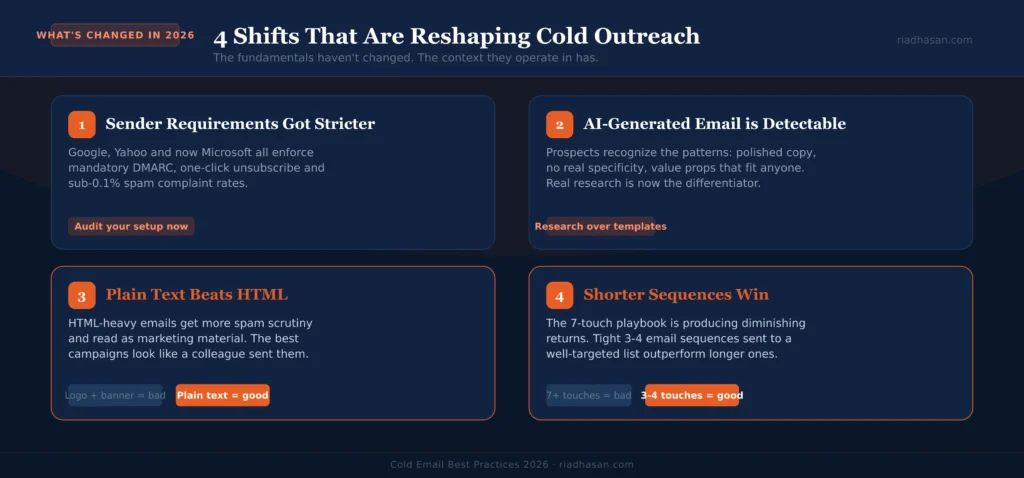
Cold email fundamentals haven’t changed. The context they operate in has.
Google and Yahoo’s sender requirements tightened
In early 2024, Google and Yahoo introduced stricter requirements for senders dispatching more than 5,000 emails per day to personal Gmail or Yahoo addresses. The rules: mandatory DMARC policy, one-click unsubscribe in headers and a spam complaint rate that stays below 0.1% (enforcement kicks in above 0.3%). These are now fully enforced, with Google escalating from temporary delays to permanent rejections as of late 2025. Microsoft followed with similar rules for Outlook and Hotmail in May 2025. If your infrastructure was set up before 2024 and you haven’t audited it since, check it now.
AI-generated cold email is everywhere and it’s detectable
Prospects are drowning in AI-generated outreach. They’ve seen the patterns: overly polished copy, no real specificity, value propositions that could apply to any company. The bar for what reads as genuine has gone up significantly. Generic personalization (“I noticed you work in SaaS”) no longer qualifies as personalization. Real research is the differentiator now.
Plain text is outperforming HTML
This has been true for a while, but it’s more pronounced in 2026. HTML-heavy cold emails get more scrutiny from spam filters and read as marketing material rather than a personal email. The highest-performing campaigns I’ve seen recently look like an email a colleague would send — no logo, no banner, no tracking pixel overload.
Shorter sequences are outperforming longer ones
The “seven-touch sequence” advice that circulated a few years ago is producing diminishing returns. After touch four or five, you’re mostly generating unsubscribes and complaints rather than replies. A tight 3–4 email sequence sent to a well-targeted list outperforms a 7-email sequence sent to a broad one. Depth of targeting beats depth of follow-up.
The Cold Email Best Practices Checklist for 2026
Before launching any campaign, run through this:
| Area | Check |
|---|---|
| Infrastructure | SPF, DKIM and DMARC configured and verified on every sending domain |
| Warm-up | All inboxes warmed for minimum 4 weeks before campaign launch |
| List quality | All emails verified, expected bounce rate below 5% |
| Targeting | ICP is specific enough that every person on the list is a genuine fit |
| Copy | Under 100 words, specific opening line, one clear CTA |
| Personalization | Opening line is specific to this person or segment — not a template |
| Sequence | 3–4 touches, each adding a different angle, spaced 3–4 days apart |
| Compliance | Unsubscribe link included, opt-outs processed immediately |
| Inbox placement | Tested with GlockApps or similar — landing in primary inbox before sending |
Frequently Asked Questions
How many cold emails should I send per day?
Per inbox, 30–50 emails per day is a safe sending limit once it’s properly warmed. Across multiple inboxes you can scale higher. The real limit is list quality and targeting precision — sending 200 emails per day to a poorly targeted list produces worse results than 50 to a well-matched one.
What’s a good cold email reply rate in 2026?
A targeted, well-personalized campaign should hit 8–15% total reply rate. Positive reply rate (people who are actually interested) typically runs 2–8%. Anything below 3% total reply rate usually points to a targeting or personalization problem, not a copy problem.
Should I use my real name when cold emailing?
Yes. Send from a recognizable personal name, not a generic company name. “Riad from [Company]” consistently outperforms “The [Company] Team.” People respond to people. The one exception is if your personal name is genuinely hard to pronounce or remember — in that case, a simplified version is fine.
How long should a cold email sequence be?
3–4 emails is the current best practice. Longer sequences generate diminishing returns and increasing spam complaints after touch four. A 4-email sequence with a well-written break-up email at the end captures most of the available replies without the deliverability risk of continuing past that point.
What cold email tools should I use in 2026?
Sending and campaign management: Instantly or Smartlead. Prospecting: Apollo.io or LinkedIn Sales Navigator. Enrichment and personalization: Clay. Inbox placement testing: GlockApps or MailReach. Verification: NeverBounce or ZeroBounce. The tool matters less than the setup and strategy behind it.
What is a cold email strategy?
A cold email strategy is the set of decisions made before a campaign runs: who you’re targeting, what problem you’re solving for them, what outcome you’re driving toward and how you’ll measure success. Tactics are the executional choices underneath that — subject line format, sequence length, sending time. Most people spend 90% of their effort on tactics and 10% on strategy. The campaigns that consistently produce results reverse that ratio.
Put It Into Practice
Cold email isn’t complicated. But it is precise. Every layer has to work together: infrastructure, targeting, copy, personalization, follow-up and deliverability. Weak at any one layer and the whole system underperforms.
The good news: most of your competition is running generic campaigns on shaky infrastructure with no real ICP. Getting the basics right already puts you ahead of most of what’s in your prospects’ inboxes.
Here’s where to go next:
- Cold Email Infrastructure Setup — domains, DNS configuration and warm-up done properly
- Cold Email Subject Lines — formulas and 60+ proven examples by niche
- Cold Email Follow-Up Guide — timing, what to say in each touch and the break-up email framework
- Cold Email Templates for B2B — real examples across 10 industries
- What Is Cold Email? — the full definition, legal overview and how it works from scratch
If you’d rather have someone build and run your cold email system for you (infrastructure, targeting, copy and campaign management included), you can work with me directly at riadhasan.com.